
 7.0k★
7.0k★by viticci
youtube-instant-article – OpenClaw Skill
youtube-instant-article is an OpenClaw Skills integration for writing workflows. Transform YouTube videos into Telegraph Instant View articles with visual slides and timestamped summaries. Use this skill whenever a user shares a YouTube URL (youtube.com or youtu.be) and asks to summarize, explain, or process the video. This is the DEFAULT skill for all YouTube video requests - do NOT use the generic summarize tool for YouTube.
Skill Snapshot
| name | youtube-instant-article |
| description | Transform YouTube videos into Telegraph Instant View articles with visual slides and timestamped summaries. Use this skill whenever a user shares a YouTube URL (youtube.com or youtu.be) and asks to summarize, explain, or process the video. This is the DEFAULT skill for all YouTube video requests - do NOT use the generic summarize tool for YouTube. OpenClaw Skills integration. |
| owner | viticci |
| repository | viticci/youtube-instant-article |
| language | Markdown |
| license | MIT |
| topics | |
| security | L1 |
| install | openclaw add @viticci/youtube-instant-article |
| last updated | Feb 7, 2026 |
Maintainer
name: youtube-instant-article description: Transform YouTube videos into Telegraph Instant View articles with visual slides and timestamped summaries. Use this skill whenever a user shares a YouTube URL (youtube.com or youtu.be) and asks to summarize, explain, or process the video. This is the DEFAULT skill for all YouTube video requests - do NOT use the generic summarize tool for YouTube. argument-hint: <youtube-url> allowed-tools: Bash(summarize:), Bash(curl:), Bash(jq:*)
YouTube Instant Article
Transform YouTube videos into Telegraph Instant View articles with visual slides and timestamped summaries.
When to Use
ALWAYS use this skill when:
- User shares a YouTube URL (any youtube.com or youtu.be link)
- "Summarize this video"
- "What's this video about?"
- "Turn this into an article"
- "Give me the gist of this video"
Only use generic summarize for:
- Non-YouTube URLs (articles, websites, PDFs)
- Explicit "just give me the transcript" requests
Quick Start
source /Users/viticci/clawd/.env && {baseDir}/scripts/generate.sh "$ARGUMENTS"
Options
| Flag | Default | Description |
|---|---|---|
--slides-max N | 6 | Maximum slides to extract |
--debug | off | Keep temp files for debugging |
Environment Variables
Required environment variables are loaded from /Users/viticci/clawd/.env:
TELEGRAPH_TOKEN- Telegraph API access tokenOPENAI_API_KEY- For GPT-5.2 summarization
Output
Telegraph Instant View article with:
- 📺 Video link at top
- 🖼️ Slides interleaved with timestamped sections
- ⏱️ Key moments with timestamps
- 💬 Notable quotes as blockquotes
- ✨ Proper title from YouTube
Architecture
YouTube URL
    │
    ├─► summarize --extract (get video title)
    │
    ├─► summarize --slides (extract key frames)
    │
    ├─► summarize --timestamps (GPT-5.2 summary)
    │
    ├─► catbox.moe (upload images)
    │
    └─► Telegraph API (create article)
Key Features
Image Hosting: catbox.moe
- No API key required
- No expiration
- Reliable CDN
- Direct URL embedding
LLM: OpenAI GPT-5.2
- Fast (~4-5 seconds)
- High quality summaries
- Automatic timestamp extraction
Layout: Interleaved Images
- Images distributed across timestamp sections
- Not grouped at top
- Each major section gets a relevant slide
⚠️ Important Notes
Instant View Timing
Telegram needs 1-2 minutes to generate Instant View for new pages. If the ⚡ button doesn't appear immediately, wait and try again.
Script Requirements
- Uses zsh (not bash) for associative array support
- Requires:
summarize,jq,curl - Optional:
ffmpeg(for local video processing)
Always Use the Script
NEVER manually create Telegraph content. Always use generate.sh:
- Ensures proper h4 headers (required for Instant View)
- Distributes images correctly
- Extracts video title automatically
Dependencies
summarizev0.10.0+ (brew install steipete/tap/summarize)jq(brew install jq)curl(pre-installed on macOS)- OpenAI API key with GPT-5.2 access
Processing Time
| Video Length | Approx. Time |
|---|---|
| < 15 min | 20-30s |
| 15-30 min | 30-45s |
| 30+ min | 45-60s+ |
Troubleshooting
"Failed to get summary"
- Check
OPENAI_API_KEYis set - Verify API key has GPT-5.2 access
- Try with
--debugflag
No Instant View button
- Wait 1-2 minutes for Telegram to process
- Verify article has content (not empty)
- Check images loaded (visit Telegraph URL directly)
Images not showing
- catbox.moe might be temporarily down
- Check upload succeeded in debug output
- Verify URLs are HTTPS
YouTube Instant Article
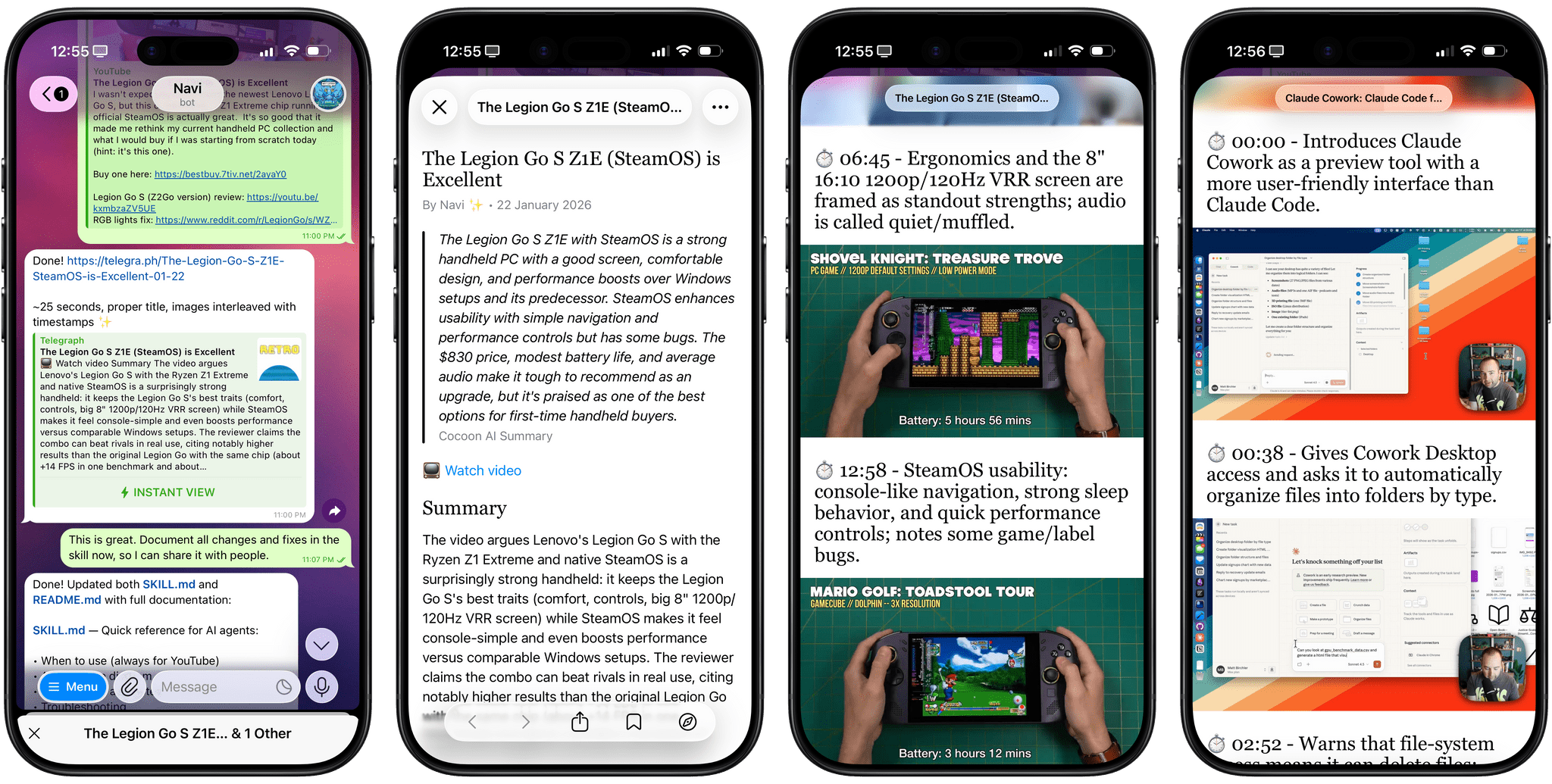
Transform YouTube videos into beautiful Telegraph Instant View articles with embedded slides and timestamped summaries.
Best used with Clawdbot + Telegram for inline article opening.
Features
- 🎬 Automatic slide extraction — Key frames from the video
- 📝 AI-powered summaries — GPT-5.2 generates concise, timestamped summaries
- 🖼️ Interleaved layout — Images paired with relevant timestamp sections
- ⚡ Telegram Instant View — One-tap readable articles in Telegram
- 🔗 Reliable hosting — Images on catbox.moe (no expiration)
Example Output
📺 Watch video

[Image: Video thumbnail]

⏱️ 0:00 - Introduction and overview of the device
The reviewer introduces the new handheld gaming device...

[Image: Device closeup]

⏱️ 5:30 - Performance testing
Testing shows impressive results with modern games...

[Image: Gameplay footage]

⏱️ 12:00 - Final verdict
Overall recommendation and pricing discussion...
Installation
Prerequisites
# Install summarize CLI
brew install steipete/tap/summarize

# Install jq (JSON processor)
brew install jq
Setup
-
Get a Telegraph token:
./scripts/setup.shThis creates a Telegraph account and outputs your access token.
-
Set environment variables:
export TELEGRAPH_TOKEN="your_token_here" export OPENAI_API_KEY="your_openai_key" -
Configure summarize (optional):
mkdir -p ~/.summarize
echo '{"model": "openai/gpt-5.2"}' > ~/.summarize/config.json
Usage
Basic
./scripts/generate.sh "https://www.youtube.com/watch?v=VIDEO_ID"
With options
# Limit to 4 slides
./scripts/generate.sh "https://youtu.be/VIDEO_ID" --slides-max 4

# Debug mode (keeps temp files)
./scripts/generate.sh "https://youtu.be/VIDEO_ID" --debug
Output
The script outputs the Telegraph article URL:
📹 Extracting slides...
📝 Getting summary...
📤 Uploading 4 slides...
🔨 Building article...
🌐 Publishing...

✅ Done!

https://telegra.ph/Article-Title-01-22
How It Works
Pipeline
- Extract video title — Gets the actual YouTube title via summarize
- Extract slides — Captures key frames at scene changes
- Generate summary — GPT-5.2 creates timestamped summary
- Upload images — Slides uploaded to catbox.moe
- Build article — Constructs Telegraph-compatible JSON
- Publish — Creates the Telegraph page via API
Image Distribution
Images are distributed evenly across timestamp sections:
- 6 timestamps + 4 images → images at sections 1, 2, 4, 5
- Remaining timestamps get no image
- Any unused images added at the end
Telegraph Format
The article uses this structure for Instant View compatibility:
<p>— Video link, paragraphs<h4>— Timestamp headers (required for Instant View)<figure><img>— Embedded images<blockquote>— Notable quotes<hr>— Section dividers
Configuration
Environment Variables
| Variable | Required | Description |
|---|---|---|
TELEGRAPH_TOKEN | Yes | Your Telegraph API access token |
OPENAI_API_KEY | Yes | OpenAI API key for GPT-5.2 |
SLIDES_MAX | No | Default max slides (default: 6) |
Summarize Config
Create ~/.summarize/config.json:
{
  "model": "openai/gpt-5.2"
}
Technical Details
Why catbox.moe?
Previous versions used freeimage.host, which had issues:
- Images sometimes returned 404
- Inconsistent availability
- SSL certificate problems
catbox.moe provides:
- No API key required
- No expiration
- Reliable CDN
- Simple upload API
Why GPT-5.2?
We tested multiple models:
| Model | Speed | Cost | Quality |
|---|---|---|---|
| gpt-5.2 | 4.5s | $0.01 | ⭐ Best |
| gpt-4o-mini | 6s | $0.0007 | Good |
| gpt-4o | 4.7s | $0.012 | Good |
| gpt-5-nano | 42s | $0.002 | Slow |
| gemini-3-flash | timeout | — | ❌ |
GPT-5.2 offers the best balance of speed and quality.
Why zsh?
The script uses zsh instead of bash because:
- macOS bash is v3.2 (no associative arrays)
- zsh is the default shell on modern macOS
- Better array handling for image distribution
Instant View Requirements
Telegram's Instant View requires specific formatting:
- h4 headers — h3 doesn't trigger Instant View
- Proper figure tags — Images must be in
<figure><img></figure> - Processing time — Telegram needs 1-2 minutes to generate preview
Troubleshooting
Script fails immediately
# Check zsh is available
which zsh

# Make script executable
chmod +x scripts/generate.sh
"Failed to get summary"
# Verify OpenAI key
echo $OPENAI_API_KEY

# Test summarize directly
summarize "https://youtu.be/VIDEO_ID" --length short --plain
Images not appearing
# Test catbox upload
curl -s "https://catbox.moe/user/api.php" \
  -F "reqtype=fileupload" \
  -F "fileToUpload=@test.png"
No Instant View button in Telegram
- Wait 1-2 minutes after sharing the link
- Visit the Telegraph URL directly to verify content
- Try sharing the link again
License
MIT
Credits
- summarize — CLI for video summarization
- Telegraph API — Article hosting
- catbox.moe — Image hosting
Permissions & Security
Security level L1: Low-risk skills with minimal permissions. Review inputs and outputs before running in production.
Requirements
- Uses **zsh** (not bash) for associative array support - Requires: `summarize`, `jq`, `curl` - Optional: `ffmpeg` (for local video processing)
FAQ
How do I install youtube-instant-article?
Run openclaw add @viticci/youtube-instant-article in your terminal. This installs youtube-instant-article into your OpenClaw Skills catalog.
Does this skill run locally or in the cloud?
OpenClaw Skills execute locally by default. Review the SKILL.md and permissions before running any skill.
Where can I verify the source code?
The source repository is available at https://github.com/openclaw/skills/tree/main/skills/viticci/youtube-instant-article. Review commits and README documentation before installing.