
 866★
866★by clawd21
ui-test – OpenClaw Skill
ui-test is an OpenClaw Skills integration for coding workflows. Plain English E2E UI testing. Describe tests in natural language, agent executes via browser tool, then exports real Playwright test scripts for CI/CD. Use when asked to create UI tests, test a website, or generate Playwright scripts.
Skill Snapshot
| name | ui-test |
| description | Plain English E2E UI testing. Describe tests in natural language, agent executes via browser tool, then exports real Playwright test scripts for CI/CD. Use when asked to create UI tests, test a website, or generate Playwright scripts. OpenClaw Skills integration. |
| owner | clawd21 |
| repository | clawd21/ui-test |
| language | Markdown |
| license | MIT |
| topics | |
| security | L1 |
| install | openclaw add @clawd21/ui-test |
| last updated | Feb 7, 2026 |
Maintainer
name: ui-test description: Plain English E2E UI testing. Describe tests in natural language, agent executes via browser tool, then exports real Playwright test scripts for CI/CD. Use when asked to create UI tests, test a website, or generate Playwright scripts. metadata: {"clawdbot":{"emoji":"🧪"}}
UI Test — Plain English E2E Testing (🧪)
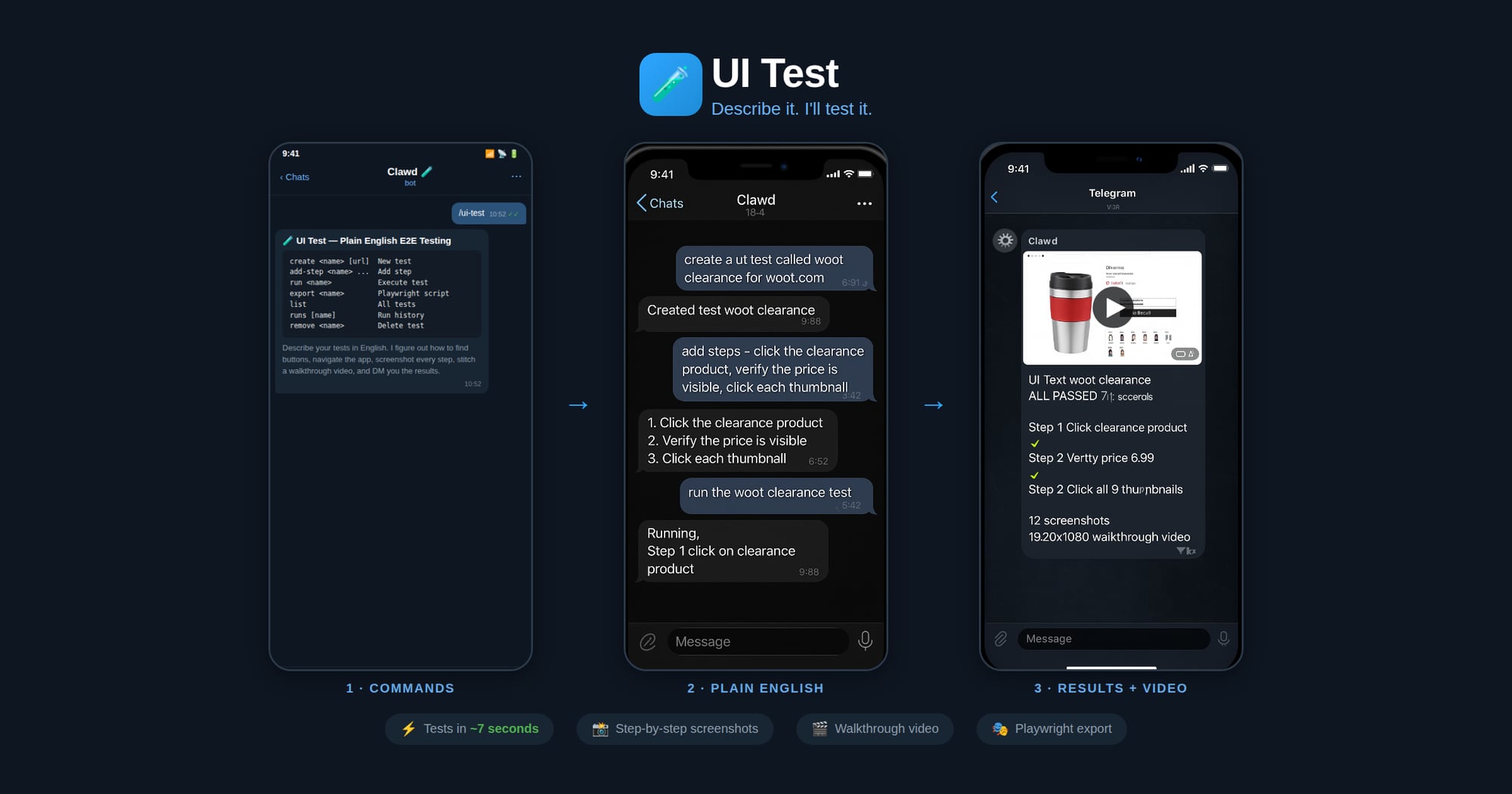
Describe your UI tests in plain English. The agent figures out how to find buttons, navigate the app flow, and execute each step — no selectors or code needed. It screenshots every major step, stitches them into a walkthrough video, and DMs you the result with a pass/fail report.
Made in 🤠 Texas ❤️ PlebLab
Workflow
- Create — User names a test and describes steps in plain English
- Run — Agent opens the clawd browser, executes each step, screenshots each action
- Export — Agent generates a Playwright
.spec.tsfrom the verified steps - CI/CD — User drops the script into their test suite, runs with
npx playwright test
Agent Execution Flow
When running a test:
- Load test definition:
node scripts/ui-test.js get "<name>" - Start clawd browser:
browser action=start profile=clawd - Navigate to the test URL
- For each plain English step:
a. Interpret what the user means (click, type, assert, wait, etc.)
b. Use
browser action=snapshotto see the page c. Usebrowser action=actwith the appropriate request (click/type/press/etc.) d. Take a screenshot after each step e. Record what selector/ref was used and whether it passed - Save run results:
node scripts/ui-test.js save-run "<name>" passed=true/false - Report results to user with pass/fail per step
When exporting to Playwright:
- Load the test definition and most recent successful run
- Map each plain English step to Playwright API calls based on what worked during execution
- Generate a
.spec.tsfile with proper imports, test structure, and assertions - Save to the user's project or a specified output path
Step Interpretation Guide
The agent should interpret plain English steps like:
| User says | Browser action | Playwright equivalent |
|---|---|---|
| "click the Sign In button" | act: click ref="Sign In button" | page.getByRole('button', {name: 'Sign In'}).click() |
| "type hello@test.com in the email field" | act: type ref="email" text="hello@test.com" | page.getByLabel('Email').fill('hello@test.com') |
| "verify the dashboard shows Welcome" | snapshot + check text | expect(page.getByText('Welcome')).toBeVisible() |
| "wait for the page to load" | act: wait | page.waitForLoadState('networkidle') |
| "click the hamburger menu" | act: click (find menu icon) | page.getByRole('button', {name: 'menu'}).click() |
| "scroll down" | act: evaluate fn="window.scrollBy(0,500)" | page.evaluate(() => window.scrollBy(0, 500)) |
| "check the Remember Me checkbox" | act: click ref="Remember Me" | page.getByLabel('Remember Me').check() |
| "select 'USD' from the currency dropdown" | act: select values=["USD"] | page.getByLabel('Currency').selectOption('USD') |
| "take a screenshot" | browser action=screenshot | page.screenshot({path: 'step-N.png'}) |
| "verify URL contains /dashboard" | check current URL | expect(page).toHaveURL(/dashboard/) |
Commands
Run via: node ~/workspace/skills/ui-test/scripts/ui-test.js <command>
| Command | Description |
|---|---|
create <name> [url] | Create a new test |
add-step <name> <step> | Add a plain English step |
set-steps <name> <json> | Replace all steps |
set-url <name> <url> | Set the test URL |
get <name> | Show test definition |
list | List all tests |
remove <name> | Delete a test |
save-run <name> ... | Save execution results |
runs [name] | Show run history |
export <name> [outfile] | Export as Playwright script |
Export Format
Generated Playwright files include:
- Proper TypeScript imports
test.describeblock with test nametest.beforeEachwith navigation to base URL- Each step as a sequential action with comments showing the original English
- Assertions where the user said "verify", "check", "should", "expect"
- Screenshots on failure
Screenshots & Video
During test execution, the agent should:
- Before each step: take a screenshot → save as
step-NN-before.jpg - After each step: take a screenshot → save as
step-NN-after.jpg - On failure: take a screenshot → save as
step-NN-FAIL.jpg
Screenshots are saved to: ~/.ui-tests/runs/<slug>-<timestamp>/
After the run completes, generate a walkthrough video:
ffmpeg -framerate 1 -pattern_type glob -i '~/.ui-tests/runs/<folder>/step-*.jpg' \
  -vf "scale=1280:-2" -c:v libx264 -pix_fmt yuv420p -y output.mp4
Then send the video to the chat.
Storage
- Test definitions:
~/.ui-tests/<slug>.json - Run history:
~/.ui-tests/runs/<slug>-<timestamp>/run.json - Screenshots:
~/.ui-tests/runs/<slug>-<timestamp>/step-*.jpg - Video:
~/.ui-tests/runs/<slug>-<timestamp>/walkthrough.mp4 - Exported scripts: user-specified path or
./tests/<slug>.spec.ts
No README available.
Permissions & Security
Security level L1: Low-risk skills with minimal permissions. Review inputs and outputs before running in production.
Requirements
- OpenClaw CLI installed and configured.
- Language: Markdown
- License: MIT
- Topics:
FAQ
How do I install ui-test?
Run openclaw add @clawd21/ui-test in your terminal. This installs ui-test into your OpenClaw Skills catalog.
Does this skill run locally or in the cloud?
OpenClaw Skills execute locally by default. Review the SKILL.md and permissions before running any skill.
Where can I verify the source code?
The source repository is available at https://github.com/openclaw/skills/tree/main/skills/clawd21/ui-test. Review commits and README documentation before installing.